onespacemedia-cms
  • Getting Started
    • Installation
    • Configuration
      • Google+ Authentication API
      • Adobe Creative SDK
      • Sentry
  • Links Module
    • Configuration
    • Usage
  • Media Module
    • Models
  • News Module
    • Features
    • Configuration
    • Usage
    • Overriding templates
      • Template hierarchy
        • news/base.html
        • news/article_archive.html
        • news/article_archive_day.html
        • news/article_archive_month.html
        • news/article_archive_year.html
        • news/article_category_archive.html
        • news/article_detail.html
    • Template tags
    • Known issues
  • Pages Module
    • How it works
    • Context processor
    • Template tags
    • FAQs
      • Can I change the content type after the page has been created?
      • Can I change the ModelAdmin fieldsets of a model admin view?
      • Can I set a filter_horizontal on a content model ManyToManyField?
      • Can I add inline model admins to content models?
  • Testing
    • Configuration
  • Moderation Plugin
    • Adding the moderation system to a model
 
onespacemedia-cms
  • Docs »
  • Links Module
  • Edit on GitHub

Links Module

The Links module provides a new page content type named “Link” which allows you to have a navigation item without a page associated.

Configuration

Ensure both cms.apps.pages and cms.apps.links are in your project’s INSTALLED_APPS then add the new model to your database with the following:

$ ./manage.py migrate

Usage

To add a Link to your site simply add a Page. If you have more than one content type you will be shown a page such as this:
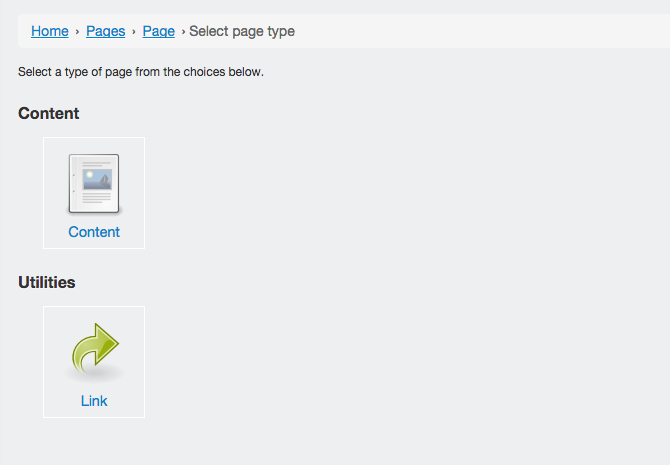
_images/content_types_link.png

If you do not have any other page content types you will be taken straight to the add form. The form itself is very straightforward, simply add the Title for the page and a URL to redirect to.

Next Previous

© Copyright 2015, Daniel Samuels.

Built with Sphinx using a theme provided by Read the Docs.